
Blog · AI tools
What AI tools left on my Mac, and what 51 days of automatic cleaning took off it
About 18 GB on one 256 GB MacBook on 12 November 2026: roughly 6 GB of caches, updates and scratch folders that come back on their own, and 10 GB of conversation history that only grows. Over the 51 days before that, RefreshYourMac's automatic cleaning ran 568 times on the same Mac and removed 389.6 GB, counting the same caches each time they returned.
I build RefreshYourMac on a 256 GB MacBook, and I use Claude, Claude Code, Codex and ChatGPT on it every day. On 12 November I measured what they keep on the disk, and read back the app’s own log of what its automatic cleaning has removed since I switched it on. These are the numbers, with what they mean.
What the AI tools were holding on 12 November
| What | Where | Size |
|---|---|---|
| Claude Code conversations (683 transcripts) | ~/.claude/projects |
6.9 GB |
| Codex sessions, archived sessions, images it made, plugins | ~/.codex |
3.1 GB |
| Codex updates it had already downloaded | ~/Library/Caches/com.openai.codex |
2.0 GB |
| Codex runtimes for running code | ~/.cache/codex-runtimes |
1.6 GB |
| Claude Code scratch folders | /private/tmp/claude-501 |
1.1 GB |
| Claude app web, code and GPU caches | ~/Library/Application Support/Claude |
1.1 GB |
| The ChatGPT app itself | /Applications |
1.9 GB |
That is about 18 GB, a little over 7% of the disk. Apart from the ChatGPT app, Storage settings shows none of it under the tools’ names, and most of it sits in folders Finder hides.
The two kinds behave differently. The caches, updates, runtimes and scratch folders are about 6 GB
and come back by themselves: the Codex runtimes were cleared on 5 September, were back to 1.6 GB ten
days later, and are 1.6 GB again now. The histories are about 10 GB and only grow. Claude Code’s
~/.claude folder was 1.7 GB on 1 October, 6.0 GB on 5 November and 7.0 GB on 12 November.
Why Claude Code’s history never shrank
Claude Code is meant to tidy its own transcripts. Its cleanupPeriodDays setting deletes them after
30 days by default. But its settings documentation also says it keeps the transcripts of sessions
started or continued in the Claude desktop app at any age, unless a second setting,
desktopSessionCleanupPeriodDays, gives them a limit too. I run Claude Code from the desktop app,
and the Mac had 132 transcripts older than 30 days, 1.2 GB in all.
If you want Claude Code to keep a limit on both kinds, ~/.claude/settings.json can say so:
{
  "cleanupPeriodDays": 30,
  "desktopSessionCleanupPeriodDays": 60
}
A transcript then goes once it is older than both numbers. It goes without a message, and you can’t
resume that conversation afterwards, so copy ~/.claude/projects somewhere first if you want a
record. The second setting needs Claude Code 2.1.248 or later.
51 days of automatic cleaning
I switched on RefreshYourMac’s automatic cleaning on 23 September. The app writes every run to its cleanup history, and this is that history for the 51 days to 12 November:
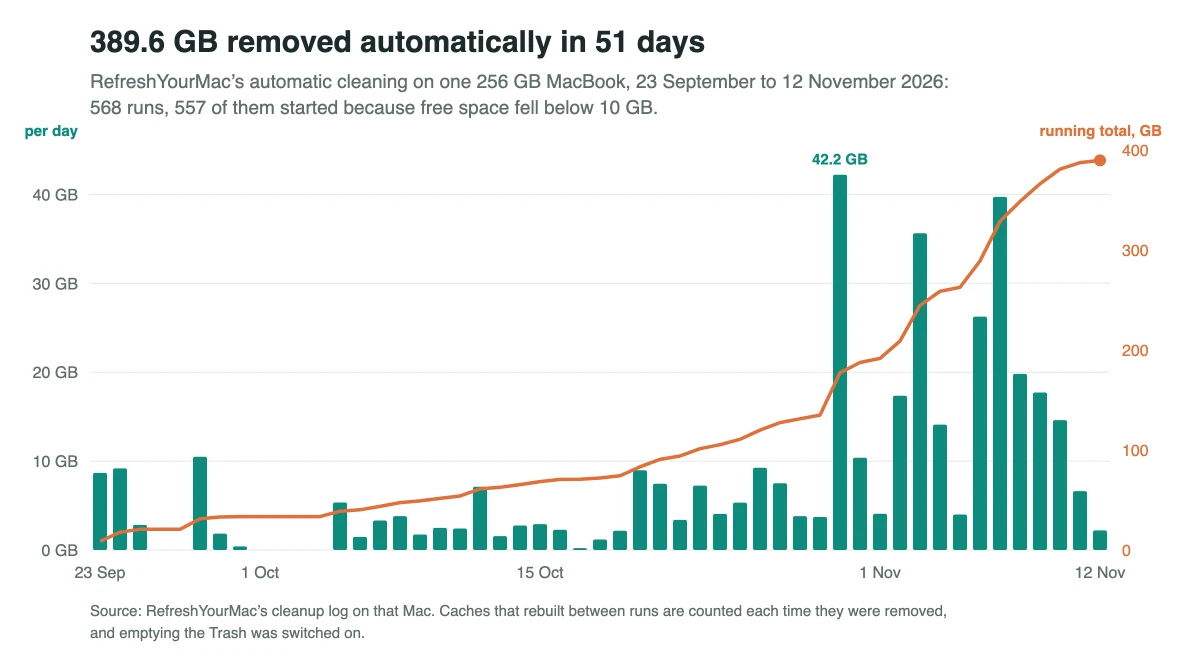
- 568 runs, on 49 of the 51 days. 557 of them started because free space fell below 10 GB, the low-space trigger. The other 11 were the daily schedule.
- 389.6 GB removed in all. That is not 389.6 GB of new space. The same caches came back and were removed again, and I have it empty the Trash too. It is the clearing-up I didn’t do by hand.
- The AI tools were part of it. Old Claude Code versions, about 250 to 300 MB each, were removed in 164 of the runs, and Codex’s downloaded updates and runtimes in 24.
Automatic runs only take what RefreshYourMac rates Safe to Remove: caches, logs, build output and downloads that come back. They skip any app that is open. The histories are never touched automatically: Claude Code’s transcripts are offered for review one at a time, only once they are a week old, and Codex’s sessions sit at Move to Backup.
Doing it by hand
All of this can be done with Finder and Terminal. The first pass takes about an hour if you check each folder and back up the histories you want to keep. After that, clearing the caches and scratch folders again takes 15 to 20 minutes a month. Where AI tools keep their data has the folders and what is safe to delete in each.
Try it
The AI tools section is in the download edition of RefreshYourMac; the Mac App Store edition is sandboxed and can’t reach these folders. The yearly plan starts with a week free, and nothing is charged if you cancel before the week is up. Before that, the download can clean up to 2 GB of safe caches and logs once, free.
What to do next: see these numbers for your own Mac. Download Atzu Storage free, or get it on the Mac App Store.
What it costs to have an app do this
| Atzu Storage | CleanMyMac | MacKeeper | |
|---|---|---|---|
| Pay once | $24.99 | €119.95 on MacPaw’s store; $89.99 for CleanMyMac X on the Mac App Store | subscription only |
| Yearly | $14.99 a year, first 7 days free | $39.99/yr on the Mac App Store; €39.95/yr on MacPaw’s store | €71.40 for the first year, 1 Mac. Their page shows it against a €119.40 list price |
| Monthly | $1.99 a month | $9.99/mo | €10.95/mo |
| Account needed | No | Yes | Yes |
Both versions' yearly plans start with 7 days free. CleanMyMac and MacKeeper prices read from their own pages and the Mac App Store on 27 October 2026; the full comparison is at Atzu Storage vs CleanMyMac and MacKeeper.