
Blog · Disk space
Photos analysis filled 12 GB of our Mac in a day
If mediaanalysisd keeps restarting, each attempt can leave a half-built 68 MB model copy in ~/Library/Containers/com.apple.mediaanalysisd/…/com.apple.e5rt.e5bundlecache, in a folder whose name contains .tmp. On our Mac that came to 186 copies and 12.68 GB in one day. The copies are abandoned and safe to delete; the finished models and Photos' analysis of your library are kept. RefreshYourMac 1.3.8 lists them as Unfinished Model Compiles and clears them on its schedule.
On the morning of 1 November our development Mac was down to 3.8 GB of free space, and it had been comfortably clear the day before. RefreshYourMac’s scan pointed straight at one file:
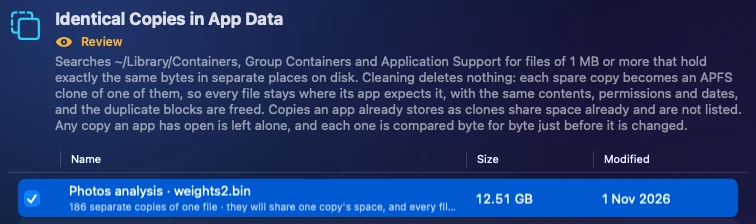
One 68 MB file, held 186 times over by macOS’s own photo analysis service.
What the files were
They were all in the same folder:
~/Library/Containers/com.apple.mediaanalysisd/Data/Library/Caches/
  com.apple.mediaanalysisd/com.apple.e5rt.e5bundlecache/…/…/<name>.tmp.<number>_<number>.bundle
mediaanalysisd is the background service that looks through your Photos library for faces,
scenes and text, and powers Visual Look Up. To do that quickly, it builds its AI models for your
Mac’s Neural Engine and keeps the result in this cache, so the work is done once.
A build writes into a temporary copy with .tmp. in its name, and keeps it only when it finishes.
Every one of the 186 still had .tmp. in its name: none of them had finished.
Why it kept growing
The service was stopping before each build finished, every two or three minutes. Each attempt started a fresh build, wrote 68 MB of model weights, and stopped before it could finish or tidy up. The first copy was made at 01:22 and the last at 13:06, roughly sixteen an hour, which came to 12.68 GB in under twelve hours. Left alone, it would have filled the remaining 3.8 GB by the afternoon.
It had happened before. On 30 October the same folder held 135 copies, 9.1 GB.
Why the service keeps stopping, we don’t know yet. This Mac is on macOS 26.5.2, and the pattern looks like a macOS bug rather than anything a person did. If you see the same thing, report it to Apple with Feedback Assistant.
Are they safe to delete?
The half-built copies are. Nothing reads a build that never finished, and the service starts a fresh one the next time it needs the model. Two things in the same container are worth keeping, though:
- The finished models, in the same cache without
.tmp.in their names. Deleting those only makes the service build them again. - Everything Photos has found in your library, elsewhere in the container. Delete that, and Photos analyses your whole library again, which takes hours.
So the right fix is narrower than “clear the cache”. It is “delete the unfinished copies, and only once nothing is still building them”.
Clearing them by hand
If you would rather do it yourself, this deletes only folders with .tmp. in their name that
nothing has written to in the last hour, and leaves the finished models alone:
find ~/Library/Containers/com.apple.mediaanalysisd/Data/Library/Caches/com.apple.mediaanalysisd/com.apple.e5rt.e5bundlecache -maxdepth 3 -name '*.tmp.*.bundle' -mmin +60 -prune -exec rm -rf {} +It frees the space, but only until the next round of failed builds, so you would need to run it again every few hours.
Fixed in 1.3.8: Unfinished Model Compiles
When RefreshYourMac first met these files, its Identical Copies in App Data category offered to make the copies share one copy’s space. That frees the space and deletes nothing, which is the only safe kind of cleaning inside most apps’ data. It can’t keep up with a leak, though: all 186 files stay, and another one arrives every few minutes.
RefreshYourMac 1.3.8 adds Unfinished Model Compiles, under Safe to Remove. It lists the .tmp.
copies in macOS’s model caches, and only when all three of these hold:
- the process that started the build is no longer running;
- nothing has written to the copy for an hour;
- nothing has a file open in the cache.
It deletes those, and never touches the finished models or Photos’ analysis. Because it is rated Safe to Remove, your scheduled clean takes it, and so does the clean that runs when free space drops below your limit. A service stuck in this loop can no longer fill the disk unnoticed.
On our Mac the clean took the 186 copies and left the 16 finished models in place, and free space went from 4.8 GB back to 17 GB. Identical Copies no longer lists the same files, so the space isn’t counted twice.
While you’re at it
The deleted copies are what the bug leaves behind; the bug is still there. Things that may break the loop:
- Restart your Mac, so the service starts afresh.
- Leave the Mac plugged in and idle for a while with Photos closed. Photos analysis mostly runs then, and a queue that gets to finish may stop retrying.
- Install any pending macOS update.
Try it
Unfinished Model Compiles and Identical Copies in App Data are in the download edition of RefreshYourMac; the Mac App Store edition cannot reach other apps’ containers. 1.3.8 updates on its own from the app, or comes with the download. The 7-day free trial shows whether your Mac has the same copies.
What to do next: see these numbers for your own Mac. Download Atzu Storage free, or get it on the Mac App Store.
What it costs to have an app do this
| Atzu Storage | CleanMyMac | MacKeeper | |
|---|---|---|---|
| Pay once | $24.99 | €119.95 on MacPaw’s store; $89.99 for CleanMyMac X on the Mac App Store | subscription only |
| Yearly | $14.99 a year, first 7 days free | $39.99/yr on the Mac App Store; €39.95/yr on MacPaw’s store | €71.40 for the first year, 1 Mac. Their page shows it against a €119.40 list price |
| Monthly | $1.99 a month | $9.99/mo | €10.95/mo |
| Account needed | No | Yes | Yes |
Both versions' yearly plans start with 7 days free. CleanMyMac and MacKeeper prices read from their own pages and the Mac App Store on 27 October 2026; the full comparison is at Atzu Storage vs CleanMyMac and MacKeeper.